If you are unable to transfer pupil data with another school, please get in touch with our support team who can set up the Transitioning tool if needed.
If Transitioning has already been set up, they will put both schools in the same cluster, with permission from the main admins or headteachers of both schools. Once both schools are in the same cluster, pupil data can be transferred. The following guide explains this setup process: https://www.tes.com/knowledge-base/provision-map/transition-tool-setup-process
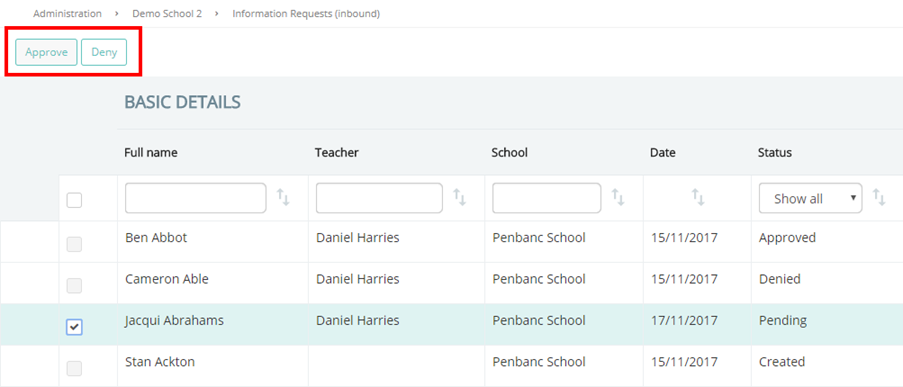
To manage incoming requests, mouse over the Transitioning tab at the top of the page and select Information requests (Approve / Deny) from the drop down menu.
You will be taken to a table of information requests. To approve or deny a request, tick the checkbox next to its entry in the table and click on the Approve or Deny buttons.
Was this article helpful?
That’s Great!
Thank you for your feedback
Sorry! We couldn't be helpful
Thank you for your feedback
Feedback sent
We appreciate your effort and will try to fix the article