Provision Map allows you to mark dates on your school calendar as holidays. Doing so will improve the accuracy of provision costs, as they will take the holiday dates into account.
If your Provision Map account has been integrated with your schools MIS, you will not be able to manually update your Provision Map calendar. Your Main School Admin will need to contact us for further information.
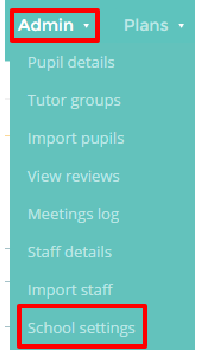
To set up school holiday dates, begin by mousing over the Admin tab and selecting the School settings option from the drop down menu.
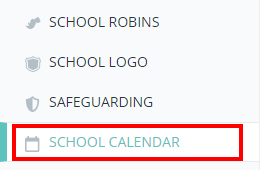
Next, either scroll down to the School calendar section, or select School Calendar from the navigation menu on the left.
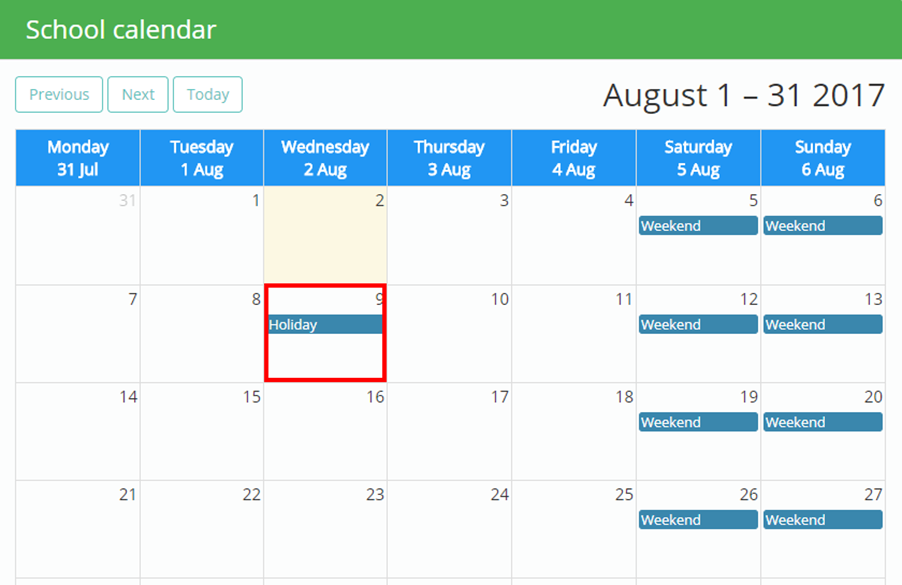
You will be presented with a school calendar. To mark a day as a holiday, click on your chosen date and a Holiday indicator will appear. To remove a date as a holiday, simply click on the date again to remove the indicator.
Was this article helpful?
That’s Great!
Thank you for your feedback
Sorry! We couldn't be helpful
Thank you for your feedback
Feedback sent
We appreciate your effort and will try to fix the article